Thursday, 9 May 2013

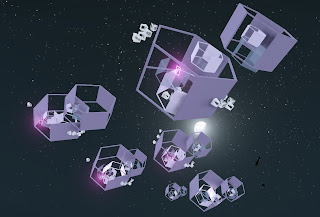
Cryengine model - lights and shadow


Had to recreate the entire model i made in Cryengine because the other model did not save properly and I wasn't able to open the file.
The model i think now does look better than the last and i have also added in three lights inside parts of the model using "light style: 3" and shadows have also been added in.

Closer view of model.


Closer view of the white objects and the shadows that they create.
Should maybe think about putting a light inside of them as they would create really interesting shadows.

Tuesday, 7 May 2013

Sketchup to Cryengine

Finally able to place my model into Cryengine, took a couple of tries as it came up as beach balls in the first attempt, but now it is there.
The textures have put into Cryengine and a glow has been added to the smaller rectangular form. The model has been repeated and various sizes have been made of them.

More of the glowing retangular shapes have been added.
There is still a random floating pipe that needs to be gotten rid of.
Note: The texture of the shapes should change a bit to add more interest.


Re-creating the design on Sketchup

I had to re-create the entire Sketchup model since i was having problems putting it into Cryengine. It would have taken too long to edit every single aspect of the old model. Some components of it has changed though and i'm not sure if i like it. It does not look as visually appealing as the other design but i'm just hoping that it will be able to be put into Cryengine successfully.

Thursday, 2 May 2013

Animation intentions

IDEA:

Have the hexagons as pieces that don't move in the model and the rest of the objects to be dispersing outwards and inwards.

Another idea is to look into kaleidoscopes and look into how they move.
http://commons.wikimedia.org/wiki/File:View_of_a_kaleidoscope.JPG
creative commons license CC-BY-SA


First thing to do though is to find some inspiration through music.


Design ideas and intentions

Proportion and composition model from project 1 (initial inspiration)


Originally, my stepping off point was from the proportion and composition model where I was inspired by the rectangular shapes, this took me into looking at how i could transform these rectangular shapes into something completely different and so i started making book-like forms and made a spiraling effect by copying and pasting objects and changing the sizes.

At the moment the inspiration is drawn from just playing around with Sketchup and the different sizes in which the objects can be made and playing around with the tools i can use.

My intentions are to create less faults in my Sketchup model so that it can be uploaded into Cryengine and to make it more complex by adding in more hexagon shapes that are not as chunky.
I do not really want to add in any more different shapes because when i start to animate the model in Cryengine, i feel it will become too chaotic. Sometimes simple is best.

Sketchup to Cryengine

Sketchup to Cryengine with my model has failed again and again. I have either kept obtaining an odd red beach ball or nothing at all. The model may have to be re-done all over again. But hopefully not. However, I have now added colour onto my model in Sketchup and it has made a significant difference.

Below are different views of the model exported from Sketchup:

Front view of model (also another point to make is that i added more of the small rectangular shapes into the model)

Side view with a slight close-up

View from the back of the model (note: not as interesting as the back and the side)

A closer view of the detailing

Even more of a close-up to see what those odd book-like shapes are


Wednesday, 1 May 2013

New texture


Thought of making my own texture for my sketchup model using acrylic paint, water, and mdf.


Edited the image.


Placed on a cube made for testing the texture and didn't really like the result.
May just use the colours on sketchup and edit it with different effects